The board platform for nonprofits
Your board meets and decides.
Steward remembers and follows through.
Steward by Qwibie is your board's AI assistant. It works across your meetings, messages, minutes, bylaws and records, shows each person only what their role allows, cites its sources, and drafts for your people to review.
14-day trial, no card · Then from $99 a month, every board member included
- MeetingsLive and between meetingsOn the record, with voting
- Document VaultYour board's records
- FinanceThe treasurer report
- MessagesConversations and announcements
- StewardReading your bylaws and records
- CommitteesCommittees that advise
- PeopleThe roster
- System LogKey actions, logged
- LegalVoting & rules
One Steward, working across every area of your board. Steward prepares; your people decide.
One plan instead of a stack of tools
Fewer tools, less busywork, and AI your board can stand behind.
Fewer vendors
One place for the board portal, shared drive, voting link, discussion app and meeting link. Every board member is included, on one plan.
Simple to use
Each job has one obvious place: meetings, decisions, documents, finance, people. It works on a phone, and Steward points you to what needs attention next.
AI your board can trust
Steward prepares and your board decides. Answers cite your own records, Steward never votes, approves or signs, and your data isn't used to train AI models.
Work that moves on its own
Agendas and packets are prepared, minutes are drafted for the secretary, and scheduled reminders go out before meetings, so the chair doesn't have to chase.
Built AI-first, from the ground up
Everything your board needs. Nothing it doesn't.
From meeting preparation and voting to minutes, records, and institutional knowledge, Steward brings everything together in one intelligent platform built for nonprofit boards.
Voting, on the record
Hold secure votes on the record, during meetings or between them, with every decision documented.
Meeting prep, handled
Steward drafts agendas, plans and minutes, and prepares reminders, for your review and approval.
Your board's institutional memory
Find past decisions, understand why they were made, and get answers backed by your board's records.
One secure archive
Keep minutes, reports, bylaws, and policies organized, accessible, and securely stored in one place.
Meetings, built in
Meet face-to-face by video, with your agenda and board materials right alongside the conversation.
Governance guidance
Make board work easier with ready-to-use templates, Parliamentary procedure resources, and a practical governance glossary.
Your board's institutional memory
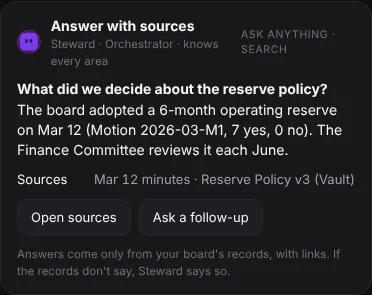
Ask why you decided it. Get the answer from your records.
Ask Steward"What did we decide about gift acceptance, and why?"
See Steward in action
See what better board governance looks like.
Two short films of a board at work. Pick the way your board meets.
The screens are Steward, shown with demo data. The people and the organization are fictional, and the people are AI-generated.
The people in this film are AI-generated.
Run a meeting between meetings
A treasurer posts a budget motion. Directors read, discuss and consent over three days, and the screen shows who has consented so far. One director asks for a meeting, which sends that motion to a live meeting instead. At the close, the record is sealed and Steward drafts the minutes for the secretary.
Read the narration
Monday morning. The treasurer posts the budget motion for the board. Decide by unanimous written consent before a fixed close, if your bylaws allow it. Over three days. Directors read, discuss and consent from wherever they are. The screen shows who has consented so far. Wednesday. One director wants a meeting. One "needs a meeting" sends that motion to a live meeting instead. At the close, the record is sealed. Steward drafts the minutes for the secretary. Qwibie. Fourteen-day free trial. No credit card required.
The people in this film are AI-generated.
Run a live meeting
The chair puts the last motion to a vote. A person calls the vote, and Steward never votes. After the chair adjourns, Steward drafts the minutes for the secretary, with the motions and votes. The secretary reviews the draft and can send it to the board for approval or request changes. Each signature is recorded with the time it was signed, and the signed record can be downloaded as a PDF.
Read the narration
The last item of the meeting. The chair puts the motion to a vote. A person calls the vote. Steward never votes. The chair adjourns the meeting. Afterward, Steward drafts the minutes for the secretary, with the motions and votes. The secretary reviews the draft. The secretary can send it to the board for approval or request changes. Each signature is recorded with the time it was signed. The signed record can be downloaded as a PDF. Qwibie. Fourteen-day free trial. No credit card required.
A simpler way to run your board
Prepare. Govern. Remember.
Board materials in one place. Meetings and decisions that stay on track. Institutional knowledge that stays with the board. Steward brings it all together, with AI handling the administrative work so your board can focus on leading.
Prepare
Spend less time getting ready. Steward helps prepare agendas, organize materials, and assemble board packets, all ready for your review.
Govern
Keep discussions, meetings, and voting in one place. Your board makes the decisions; Steward helps keep everything moving.
Remember
Steward answers from your minutes, documents and the record of votes, with sources, so the next chair can ask what was decided and find where it came from.
One board: $99/month or $990/year. Every board member included. Compare with what your board spends today.
What Steward does in each area
One AI assistant, Steward by Qwibie, works in every part of running your board. It drafts, checks and reminds; your people review and decide. Type to Steward, or talk to it.
- Steward
- Ask anything about your board and Steward by Qwibie answers from your own records, with sources, and shows each person only what their role allows. It works in every area below, and you can type or talk to it.
- Meetings
- Steward prepares the agenda and packet for the chair. Meet live, or decide between meetings by unanimous written consent before a fixed close. Steward drafts the minutes for the secretary, who approves or asks for changes.
- Messages
- Conversations and announcements in one place. The announcement you haven't read stays on top, and Steward helps you write and shows what's waiting on you.
- Committees
- Each committee has its own space to meet, work through its documents and send its recommendation to the board. Committees advise; the board decides.
- Document Vault
- One vault for your documents: Steward reads and files them, finds them fast, and keeps privileged items restricted to the right people.
- Finance
- Upload the financials and Steward drafts the treasurer report, with budget against actual by fiscal year. People approve it; nothing moves money.
- People
- The roster and roles, kept current. Steward prepares invitations for you to approve.
Coming soon
Qwibie for mobile
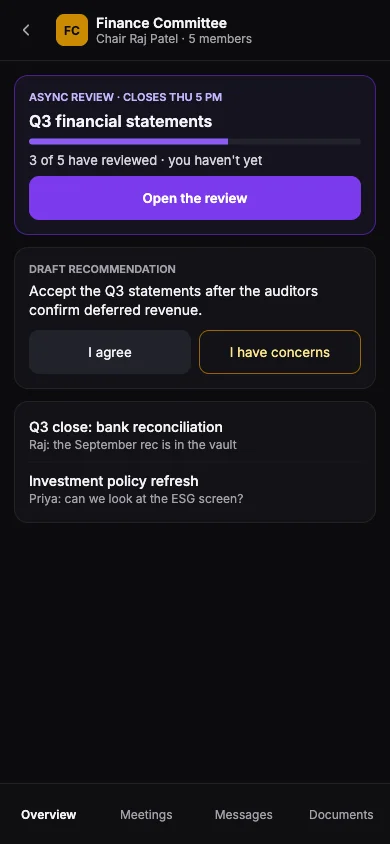
Messages, live meetings, decisions between meetings and committee work, with your board in your pocket. A design preview on a fictional board.
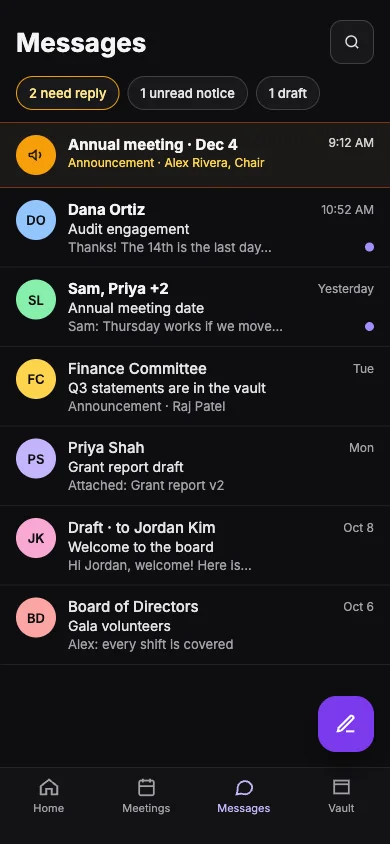
Messages
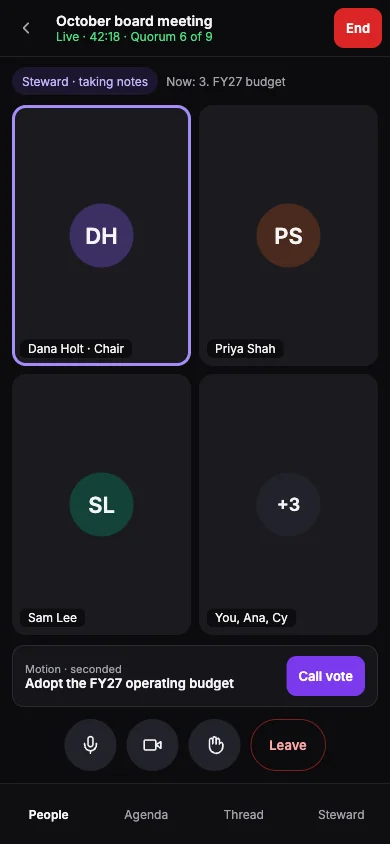
Live meeting
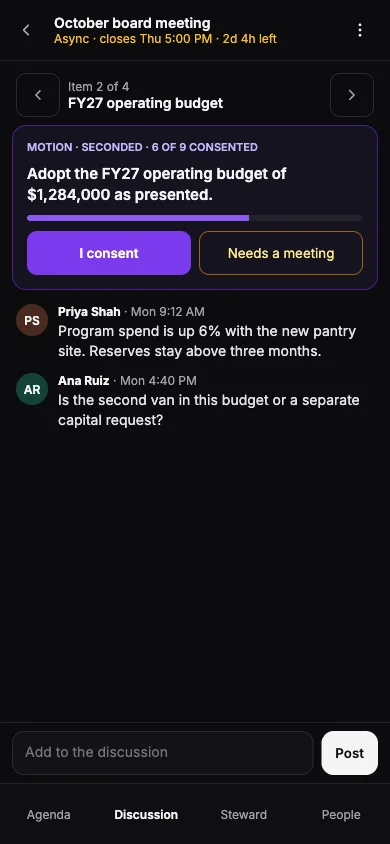
Between meetings
Committees
Design preview · fictional board. Qwibie for mobile isn't available yet.
Between meetings
Board work doesn't wait for the next meeting.
Decide between meetings by unanimous written consent before a fixed close, or walk into a shorter live meeting with the packet done and the minutes drafted. Committees do their review on their own time and bring the board a recommendation.
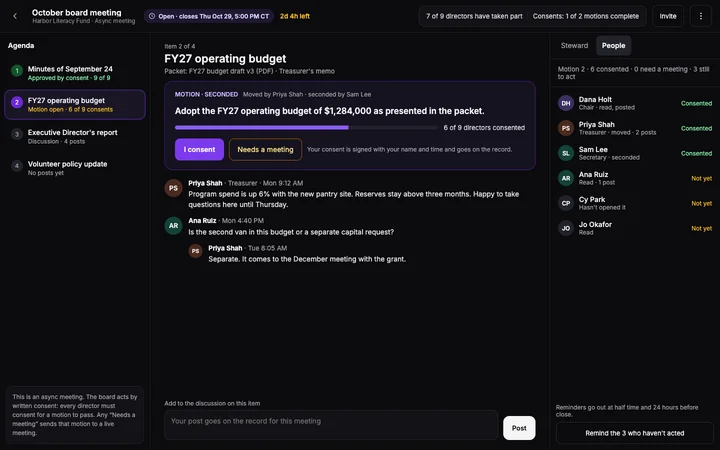
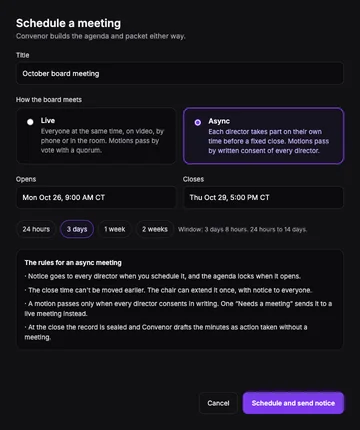
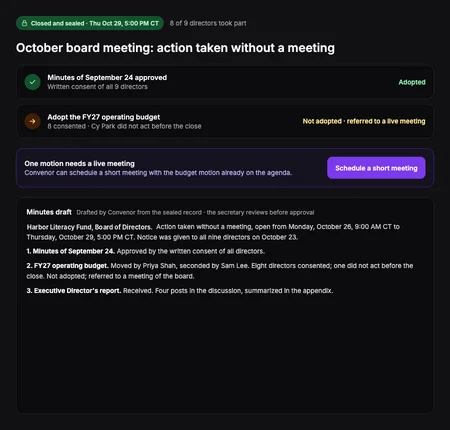
Steward: a decision between meetings, scheduling, and the closed record
Meetings · The Board
Decide by written consent, on the record.
Choose live or between meetings when you schedule. Directors read the packet, discuss each item and consent from wherever they are, on a laptop or a phone.
- Every director gets notice, and the agenda locks when it opens.
- A motion passes only when every director consents in writing before the close.
- One “needs a meeting” sends that motion to a live meeting instead.
- Reminders go to the directors who haven't acted yet.
- At the close the record is sealed, and Steward drafts the minutes as action taken without a meeting for the secretary.
Committees
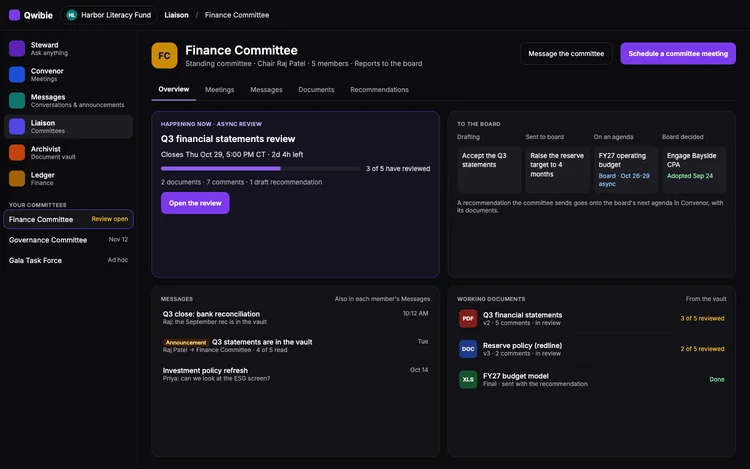
Committees that do the homework.
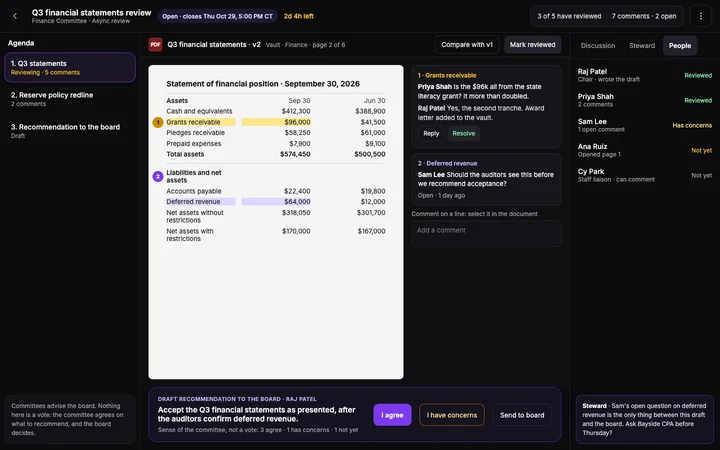
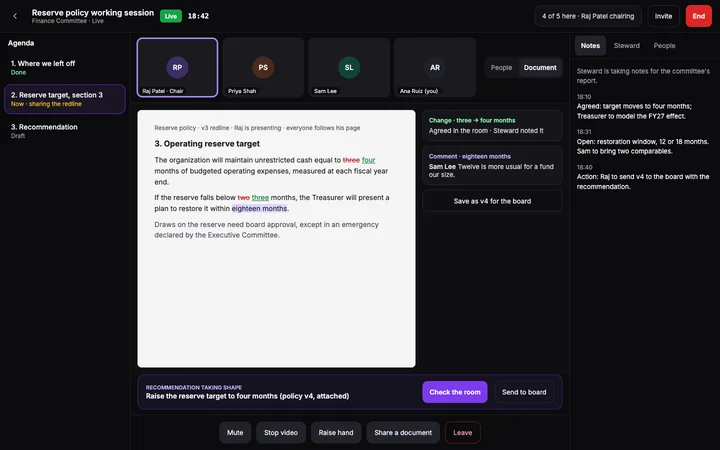
Finance, governance, audit: each committee has its own space, meets live or reviews on its own time, and sends the board a recommendation with the work behind it.
- The committee reviews its documents on members' own time, before a set close.
- Members comment on the documents and ask their questions in the committee's own conversation.
- Each member says “I agree” or “I have concerns”: the sense of the committee, not a vote.
- The recommendation goes to the board. Committees advise; the board decides.
Steward: committee review, committee home, and a live committee session
Routine steps, handled
The routine steps run themselves. The decisions stay with you.
Agenda and packet
Steward prepares the agenda and gathers the packet, ready for the chair to review.
Reminders
Scheduled reminders go out before the meeting, so the chair doesn't have to chase.
Minutes
Steward drafts the minutes with the motions and votes. The secretary reviews; the board approves.
Committee to board
A committee sends its recommendation to the board's agenda. Committees advise; the board decides.
Signed minutes you can check
Approved minutes are signed in order, secretary first, then a different officer.
Safeguards
Safeguards that keep people in charge.
A board answers to the people it serves. Steward is built for that: it does the preparation, and people make every decision on the record.
- Steward prepares and your board decides. It never votes, approves or signs for you.
- When AI note-taking is on, Steward's tile says so in the room. Qwibie doesn't store the audio.
- When Steward answers from your records, it shows its sources so anyone can check.
- Every vote is cast by a person. Qwibie sends vote links, reminders and results when those steps happen.
- Votes between meetings are added to an append-only, hash-linked record.
- Key governance actions go into your board's System Log: who, what and when.
- Access follows each person's role. Each organization's records are kept separate.
- We don't use your board's data to train AI models.
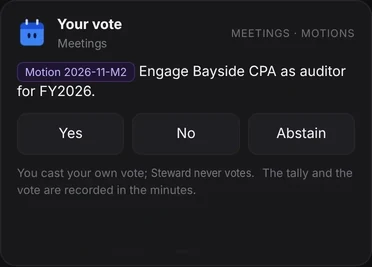
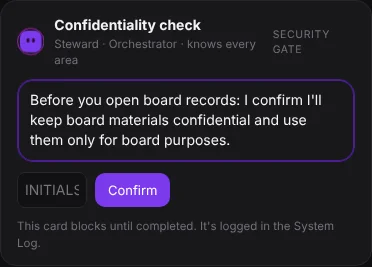
Steward: casting a vote, and a confidentiality check
YOUR FIRST USEFUL SESSION
Bring your records. Give Steward a real question.
No need to rebuild your board's history. Start with last year's records, this year's work so far, your bylaws and other official documents. Attach the files; Qwibie analyzes and organizes them.
- 1
Ask and check
Ask Steward about a past decision. Follow its citations back to your minutes or policies and see how useful your records can become.
- 2
Invite and connect
Invite your directors and officers, review the recipients, then send your first message to the board. Every board member is included.
- 3
Work through an urgent matter
Raise it with the board in a message, with the background and documents. Then decide on the record, in a meeting or a vote between meetings, the way your board's rules allow.
- 4
Prepare your next meeting
Set up the meeting and prepare the agenda and packet. Meet in Qwibie by video or phone (dial-in), with motions and votes captured as you go. Afterward, review the draft minutes your secretary receives.
14 days free. No card. Start with a few useful documents.
$99 a month for one board, $299 for up to five. Every board member included, every feature. 14 days free, no card.
Start free trialFrequently asked questions
- No. Steward drafts, checks and reminds; your people review and decide. Every vote is cast by a person, and key actions are recorded in the System Log.
- No. Your board's documents and records are never used to train AI models.
- Every director, officer and staff member you invite is included in the plan price. There is no per-seat charge.
- Yes. Upload your existing files and Qwibie reads and files them by type, so past minutes and policies become searchable.
- No. Meet in Qwibie by video or phone (dial-in), or upload your notes or the transcript your meeting tool already produces.
- No card is needed to start. On day 14 the trial stops unless you choose a plan. Nothing is charged automatically and there is nothing to cancel.